Torquing to spec...
Stop Driving 40 Minutes for an Oil Change.
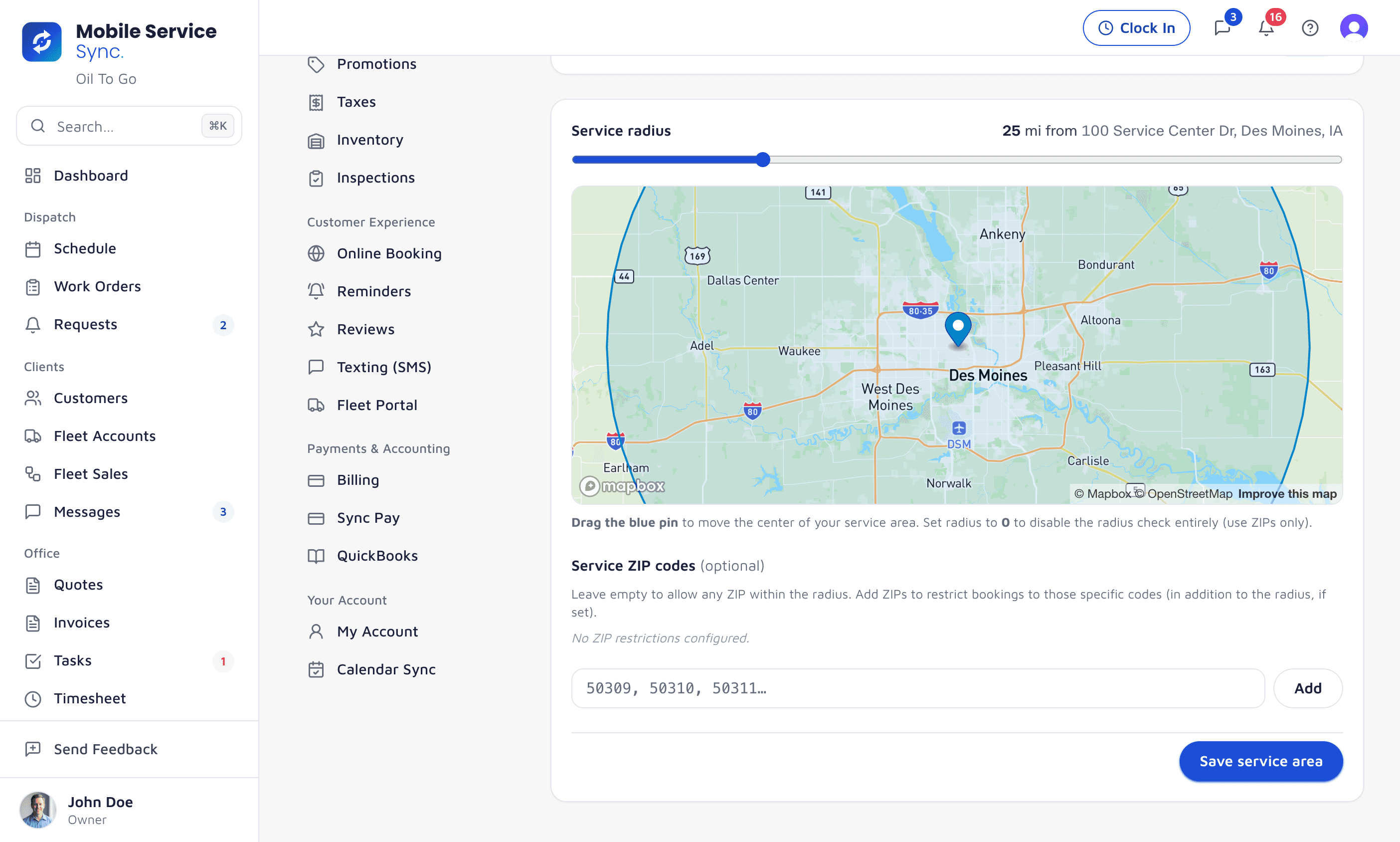
Draw a radius around your HQ or list your service ZIPs. The booking widget rejects out-of-area requests before you waste time, and anything borderline lands flagged for review so you decide on the spot.
app.mobileservicesync.com / settings / service-area
Pick the Model That Fits Your Shop.
Distance From HQ
20-mile, 35-mile, 50-mile radius from home base - whatever you'll actually drive. One slider, done.
ZIP Code List
Best for shops with awkward shapes - rivers, county lines, traffic dead zones. Paste in the list, done.
Enforced on Every Address
The same rules run on the public booking widget, the embedded version on your site, and jobs created by hand in the CRM.
Customers Find Out Before They Pick a Time.
When a customer enters an address outside your area, the booking widget says so before they ever pick a time. You don't take the booking, then have to call them back to cancel.
- Address-validated at step 1
- Clear 'sorry, out of area' before a time is picked
- Out-of-area requests flagged for your review, not auto-booked
- Contact info captured as a lead in case you expand
Step 1 · Where are we coming?
4582 Maple Ridge Rd, Ankeny, IA 50023
Just outside our service area
We don't currently serve Ankeny, but we're expanding. Want us to let you know when we get there?
Flag the Borderline Ones.
Got a request that's right at the edge of your zone? It lands flagged for review instead of auto-confirming. Price it up, schedule it for a slow day, or pass - your call, not the algorithm's.
- Out-of-area requests land as pending review
- Approve or decline before it hits a tech's route
- Customer and address details captured either way
- In-area bookings confirm automatically
CustomerDriveStatus
- Megan RodriguezDes Moines, IA12 minIn area
- Northside PlumbingUrbandale, IA18 minIn area
- Iowa SolarWaukee, IA28 minBorderline
- DSM CateringPleasant Hill, IA22 minIn area
- Rural CustomerIndianola, IA47 minOut
Service-Area Logic, Not Chaos.
Set It in Minutes
A radius slider and a ZIP list in settings. Change it any time - the booking widget picks it up immediately.
No Silent Bad Bookings
Anything outside the zone is flagged before it lands on a route, so a bad address never costs you a drive.
Leads, Not Lost Calls
Out-of-area requests are stored with contact info. When you expand, you start with a call list, not a blank map.
Say No to Out-of-Area Work, Automatically.
Service-area management is included on every plan. Set it once and your booking widget stops wasting your dispatcher's day.